
















Sold out
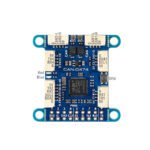
Matek AP Periph CAN Node CAN-L431
$20.99
| Weight | 0.014 kg |
|---|
Out of stock
Description
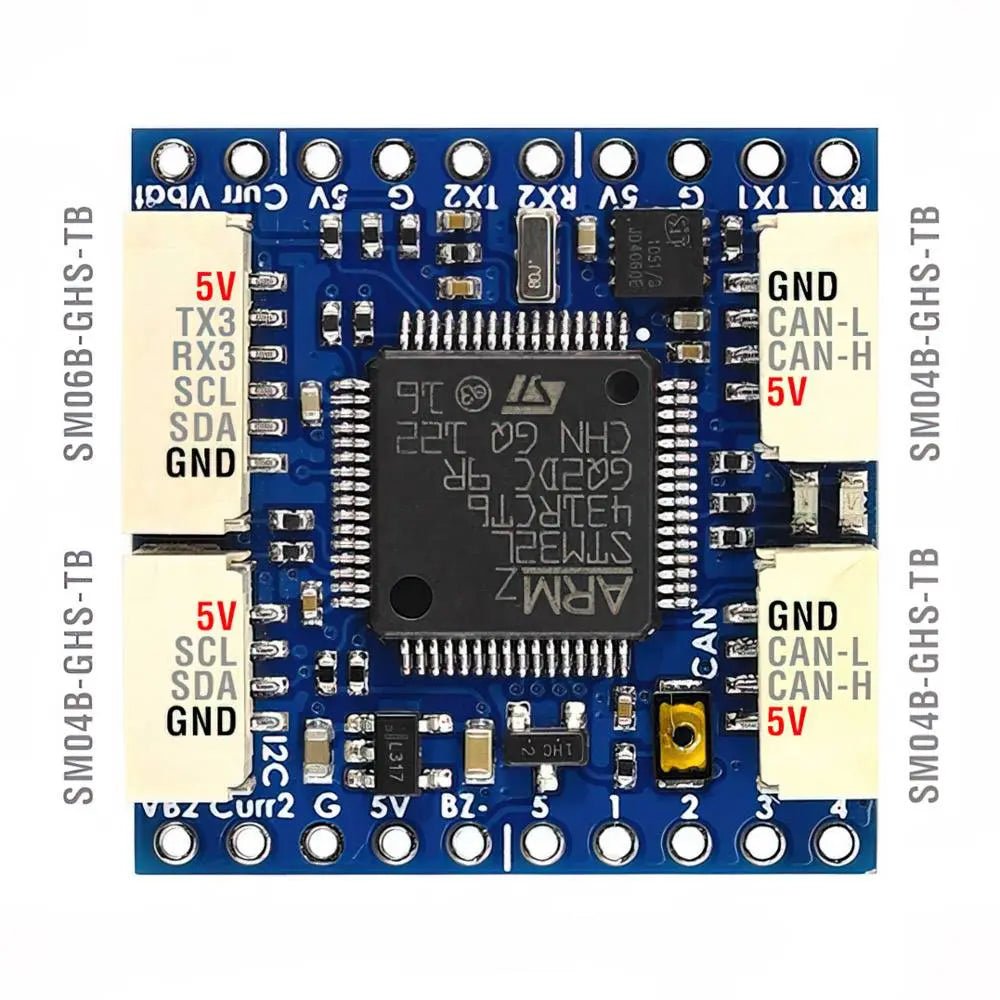
The Mateksys CAN-L431 is an Adapter Node based on ArudPilot AP_Periph firmware. With this board, you can easily utilize the ArduPilot driver library to convert ArduPilot-supported GNSS, Compass, Barometer, Airspeed sensor, and GPIO-based (PWM, Buzzer/LED notify) peripherals to DroneCAN bus peripherals.
Check out our all our Receivers and the rest of our Matek products!

Features:
- ArduPilot AP_Periph MatekL431-Periph, or MatekL431-Airspeed Firmware
- CAN transceiver data rates up to 5 Mbit/s in the CAN FD fast phase
- 4.5-5.5V Voltage Range
- LED Indicators
- 3 UARTs
Specifications:
- MCU: STM32L431xC, 256KB Flash
- CAN transceiver data rates up to 1 Mbit/s
- 1x CAN, DroneCAN Protocol (2x GH-4P connectors in parallel)
- 3x UARTs
- UART1, spare
- UART2, MSP default, DFU
- UART3, GPS default
- 1x I2C
- for peripheral Airspeed sensor
- for peripheral Barometer
- for peripheral Compass QMC5883L
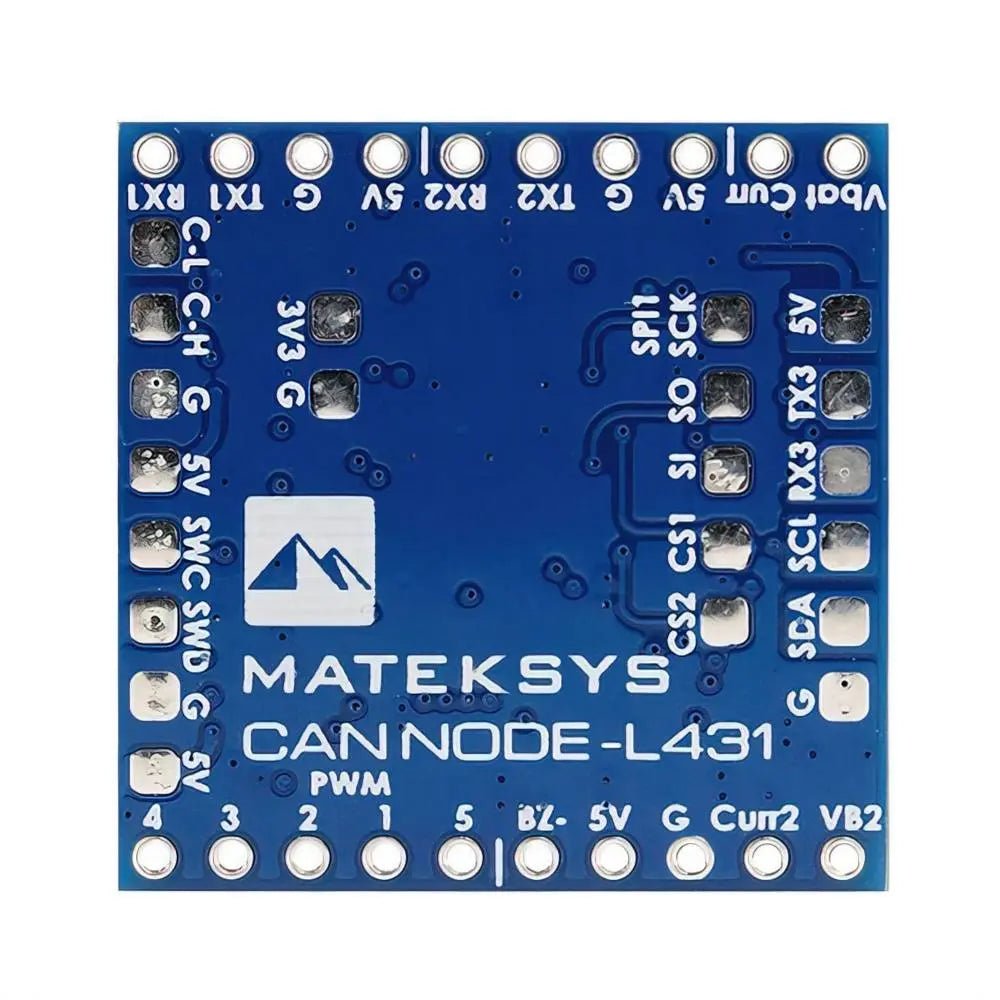
- 1x SPI
- for peripheral RM3100
- 4x ADC
- BATT_VOLT, PIN 5
- BATT_CURR, PIN 6
- BATT2_VOLT, PIN 15
- BATT2_CURR, PIN 16
- 5x PWM outputs
- 1x GPIO with TIM16 for buzzer
- ST debug, SWCLK & SWDIO
- LED
- Blue, Fast blinking, Booting
- Blue, Slow blinking, working
- Red, 3.3V indicator
- Input voltage range: 4.5~5.5V @5V pad/pin
- Power consumption: 40mA
- Operating Temperatures: -20~80 °C
- Physical
- 2x JST-GH-4P(SM04B-GHS-TB) for CAN
- 1x JST-GH-4P(SM04B-GHS-TB) for I2C
- 1x JST-GH-6P(SM06B-GHS-TB) for UART3+I2C
- Board Size: 26mm*26mm*6mm. 3.7g
- 3D file : CAN-L431_STEP.zip
- Firmware
- ArduPilot AP_Periph MatekL431-Periph, or MatekL431-Airspeed
- Update via DroneCAN GUI Tool
| SLCan Mode CAN1 > Parameters | Parameters | |||
| UART | TX1 RX1 | UART1 | Serial PORT 0 | USER |
| TX2 RX2 | UART2 | Serial PORT 1 | MSP_PORT 1 | |
| TX3 RX3 | UART3 | Serial PORT 2 | GPS_PORT 2 | |
| I2C | SCL/SDA GH connector | PB13/PB14 | Baro SPL06 | Address 0x76 |
| QMC5883L | Default parameters | |||
| MS4525 MS5525 | ARSP_TYPE 1 ARSP_TYPE 3 | |||
| SPI1 | SCK, SO, S1, CS1 | RM3100 | ||
| ADC | Vbat pad | PA0 | 0~69V 1K:20K divider builtin | BATT_MONITOR 4 BATT_VOLT_PIN 5 BATT_VOLT_MULT 21 |
| Curr pad | PA1 | 0~3.3V | BATT_CURR_PIN 6 | |
| VB2 | PB0 | 0~3.3V | BATT_MONITOR 4 BATT2_VOLT_PIN 15 | |
| Curr2 | PB1 | 0~3.3V | BATT2_CURR_PIN 16 | |
| PWM | 1 | PA8 | TIM1_CH1 | OUT1 |
| 2 | PA9 | TIM1_CH2 | OUT2 | |
| 3 | PA10 | TIM1_CH3 | OUT3 | |
| 4 | PA11 | TIM1_CH4 | OUT4 | |
| 5 | PA15 | TIM2_CH1 | OUT5 | |
| 2812 LED OUT5_FUNCTION 120 NTF_LED_TYPES 257 | ||||
| Buzzer | Bz- | Passive buzzer – | ||
| 5V | Passive buzzer + | |||
| Disable GPS | GPS_TYPE 0 GPS_PORT -1 | |||
| Disable compass | COMPASS_ENABLE 0 | |||
| Disable Battery monitor | BATT_MONITOR 0 BATT2_MONITOR 0 | |||
| Disable MSP | MSP_PORT -1 | |||
Parameters in Flight controller
- CAN_D1_PROTOCOL = 1
- CAN_P1_DRIVER = 1
- GPS_TYPE = 9 DroneCAN
- COMPASS_TYPEMASK DroneCAN (Unchecked)
- ARSPD_TYPE = 8 (DroneCAN)
- NTF_LED_TYPE -> DroneCAN (Checked)
Tips
- MatekL431-Periph firmware support I2C compass QMC5883L by default
- If you connect other I2C compass to this board, you need to update it with this firmware via DroneCAN GUI or SLCAN mode in Mission Planner.
Tutorial : Using MatekL431 adapters for PWM and DShot
Package Includes:
- 1x CAN-L431 board
- 1x JST-GH-4P to JST-GH-4P 20cm silicon wire
- 1x JST-GH-6P to JST-GH-6P 20cm silicon wire
Reviews (0)
Only logged in customers who have purchased this product may leave a review.
Shipping and Delivery
















Reviews
There are no reviews yet.